Free Instagram DP Maker - 320x320, No Signup, No Watermark

Circular crop, transparent PNG, blur backgrounds, and filters — free in your browser

Create a clean Instagram profile picture in your browser. Crop and position your photo for the circular Instagram frame, add a filter, frame, text, or other effects, then download your finished DP at 320×320px. No signup or watermark.

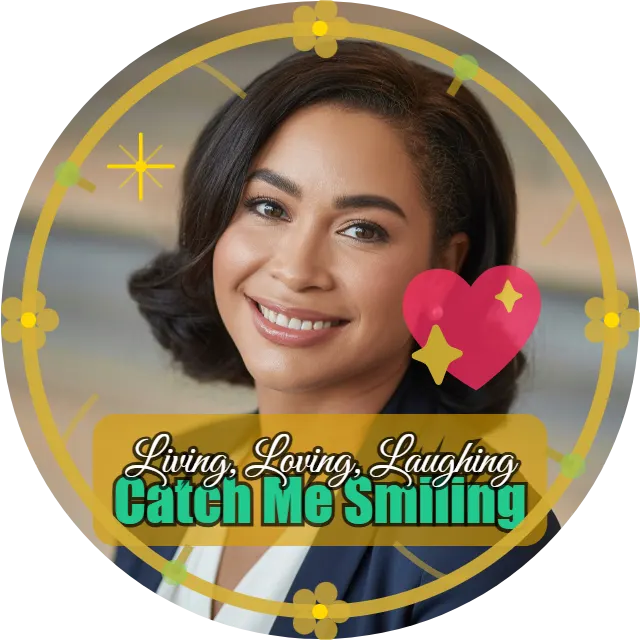
Instagram DP made with DP Maker — gold frame, heart emoji, text overlay, and stickers on circular profile picture
No upload · No signup · 100% free
320 × 320 · Instagram
Drag text on canvas to move
JPG
PNG
WebP
Quality 92%

What Size Is an Instagram Profile Picture?

How to Make an Instagram DP (Step by Step)

  • 1-

    Open DP Maker — no signup or app install required. Use it in your browser on mobile, tablet, or desktop.
  • 2-

    Upload your photo — JPG, PNG, WebP, AVIF, and HEIC files are supported.
  • 3-

    Instagram profile picture size (320×320) is already selected — no manual setup needed.
  • 4-

    Choose your crop mode. Fill mode fills the full circle — best for portraits and close-up shots. Fit mode shows your full photo inside the circle with a background behind it. Manual Crop mode gives you a drag-and-drop crop box with corner handles.
  • 5-

    Zoom, pan, and position. Use the zoom slider (50%–300%), pan X/Y sliders, or drag the photo directly on the canvas.
  • 6-

    Add backgrounds, filters, frames, text, stickers, or emojis as needed.
  • 7-

    Click Download — JPG, PNG, or WebP at full 320×320 resolution. No watermark ever.

Tips for a Great Instagram Profile Picture

Center Your Face, Not Your Full Body

Instagram’s circular frame cuts everything outside the circle. Full-body shots leave your face tiny and unreadable at thumbnail size. Use Fill mode and zoom to 120–150% so your face fills most of the circle. The pan slider lets you position your eyes and forehead exactly where you want. A closer crop usually makes your face easier to recognize at Instagram’s small profile-picture size.

Use Blur Background for a Studio Look

Fit mode with blur background uses your own photo as the background — blurred heavily and darkened behind the circle. No design skills needed. A blurred background can keep the subject clear while giving the finished DP more visual separation. It is the fastest way to make a dp with blurred background that looks intentional rather than accidental.

Export Your Instagram DP with Transparent Background — Circle PNG

If you want an instagram dp with transparent background, use the PNG export option. DP Maker exports a real transparent circle — not a circle on a white box. Use the soft edge slider to fade the circle’s edges into transparency for an even cleaner result. Useful if you ever use your profile picture on a story highlight cover, a website, or any surface where the background is not white.

Keep Text Short and Readable

Instagram profile pictures are displayed at 110px on most screens. A lot of text becomes unreadable at that size. If you add a name, keep it short. Use the pill background in the text panel — it puts a colored box behind your text so it reads clearly against any photo. The free instagram dp maker includes 17 self-hosted fonts so you can match any style without installing anything.

Match Your Filter to Your Grid Aesthetic

Vivid boosts saturation and contrast — good for bright, energetic accounts. Fade gives a matte film look popular for creative and editorial profiles. Warm adds a golden sunset tone. Cool shifts to a blue-toned, desaturated palette. B&W is clean for minimal accounts and also widely used for mourning and memorial DPs. Use the manual brightness, contrast, and saturation sliders to fine-tune beyond the presets.

Use a Gold Frame for Celebration DPs

Gold frame profile pictures are extremely popular for Eid, Diwali, weddings, and birthdays. DP Maker has 7 ornamental gold frame styles drawn directly on the canvas — crisp at any resolution. For a decorative look, the sunburst, floral, and compass rose frames keep their details visible even at small profile-picture sizes. Adjust opacity and scale to control how prominent the frame appears.

Instagram DP Maker Features

Transparent Circle PNG Export

Export a PNG with transparency around the circular photo instead of a solid square background. This is useful when you want the profile picture to sit cleanly on another design or background.

You can also use the Soft Edge control to feather the outer edge of the photo for a softer transition into transparency.

Soft Edge / Feathered Circle

The soft edge slider creates a feathered circle profile picture — a radial fade where the center of your photo is sharp and the edges dissolve into the background. In Fill mode it works as a radial feather outward from center. In Fit mode it creates a linear feather at the photo edges into the background. DP Maker is the only free browser tool with a built-in softness slider. KD on these keywords is 5–8. Profile picture with soft edges transparent and profile picture fade to transparent circle are completely unowned in search — DP Maker is the answer to every one of them.

DP Maker is the only free browser tool with a built-in softness slider. KD on these keywords is 5–8. Profile picture with soft edges transparent and profile picture fade to transparent circle are completely unowned in search — DP Maker is the answer to every one of them.

Blur Background — Instagram-Native Look

The blur background option takes your uploaded photo, applies heavy blur with brightness darkening, and uses it as the canvas background behind the circle. The result is a dp with blurred background that looks like it was shot in a studio. The blurred version keeps the subject prominent while using the original photo as a softer background.

Gradient Backgrounds

Three gradient types — Linear, Radial, and Conic. Up to 6 color stops, each with its own color picker and position slider. An angle slider for linear gradients from 0° to 360°. Use gradients to create a studio background dp maker look without any photo behind the circle. Popular for brand accounts and creators who want a consistent color scheme across their profile picture.

Three Crop Modes — Fill, Fit, and Manual

Fill mode: photo fills the entire circular frame, no white space — best for portraits.

Fit mode: full photo visible inside the frame, background fills the rest. Use with blur background or gradient for the best result. The Edge Blend slider in Fit mode softens the boundary between the photo and the background.

Manual Crop mode: interactive crop box with drag handles and corner resize. Set the exact crop area, click Apply Crop, then optionally use soft edge on the result. Fit mode is useful when you want to keep more of the original photo visible instead of filling the entire circle.

Filters — Six Presets and Manual Controls

Six preset filters: None, Vivid, Warm, Cool, B&W, and Fade. Plus manual sliders for brightness, contrast, and saturation. Use the presets for a quick change, or adjust brightness, contrast, and saturation manually when you want more control over the final look.

Event Presets — Eid, Diwali, Ramadan, and More

12 event presets apply a themed decorative ring overlay around the circular photo. For Instagram’s South Asian and Muslim audience, the Eid dp maker preset, Ramadan dp maker preset, and Diwali dp maker preset are the most used. Each has three independent ring color pickers — customize the colors while keeping the ring structure. Selecting a preset also auto-filters the Stickers panel to show only relevant stickers for that event.

Choose an event preset such as Eid, Ramadan, Diwali, Birthday, or New Year to add a themed ring around your photo. You can customize the ring colors and combine the preset with relevant stickers.

Text Overlay — Two Lines, 17 Fonts

Two independent text lines with full control per line. The dp with my name feature supports 50 characters per line with 17 self-hosted fonts — Dancing Script, Pacifico, Great Vibes, Bebas Neue, Oswald, Raleway, Playfair Display, and more. All fonts work in private/incognito mode with no Google Fonts dependency. Add a name, short tagline, date, or other text using the two text lines and available fonts.

The pill background puts a rounded color box behind your text — readable on any photo. Opacity and border radius sliders control how it looks. The line gap slider supports negative values for stacked text effects. 

Gold Frames — 7 Canvas-Drawn Styles

Seven ornamental gold frames: Radial glow with gem dots, Floral with leaves and petals, Multi-ring gradient, Compass rose with star accents, Concentric multi-band, Fine line rings, and Sunburst with outer gems. All drawn with the Canvas API — vector-quality at any resolution, no image files. Golden frame dp maker and gold border profile picture maker are served by low-quality template sites. Gold circle frame profile picture, dp with golden border free, sunburst frame profile picture, floral frame dp maker, and compass rose dp frame are all low KD searches — some at zero dedicated tool coverage.

Gold circle frame profile picture, dp with golden border free, sunburst frame profile picture, floral frame dp maker, and compass rose dp frame are all low KD searches — some at zero dedicated tool coverage. Opacity slider from 0–100% and scale slider from 50–150% let you control how prominent the frame sits over your photo.

Custom PNG Overlay — Twibbon Alternative

Upload any transparent PNG and place it over your photo. Size, opacity, 9-point position grid, and blend modes — Normal, Multiply, Screen, Overlay. Use your own transparent PNG as an overlay for an event frame, badge, logo, watermark, or other custom design. DP Maker accepts any PNG — official event frames, brand logos, country flag overlay profile picture, campaign badges, or your own brand watermark.

Profile picture frame upload own png, twibbon style dp maker, and campaign frame profile picture maker are all searches where DP Maker is the correct answer and currently has no competition.

Stickers — 47 Event-Filtered

47 pre-built stickers drawn with the Canvas API. The stickers panel auto-filters by the active event preset — so when you switch to Eid, only Eid stickers show.  Birthday sticker dp maker, diwali sticker dp maker, ramadan sticker profile picture, and new year sticker profile picture are all underserved. Size, position, and opacity controls on each sticker after placing.

Emojis — 96 With Rotation

96 emojis across 6 categories — Faces, Hearts, Celebration, Animals, Food, Symbols — 16 per category. Dp with emoji maker, profile picture emoji overlay, and instagram dp with emoji are all covered in the browser without any app install. You can also rotate emojis after placing them on the canvas. Heart emoji profile picture maker and emoji dp maker no watermark are also weakly covered.

Shapes — 12 Canvas-Drawn

12 geometric and decorative shapes: Circle, Square, Triangle, Star, Heart, Pentagon, Hexagon, Diamond, Arrow, Cross, Ring, and Burst. Each has fill color, stroke color, stroke width, size, position, and rotation.  

Border Styles — Six Options Including Double and Dashed

Six border styles: None, Thin, Medium, Thick, Double, and Dashed. Seven preset color swatches plus a custom color picker.  

No Signup or Watermark

Create and download your Instagram DP without creating an account or adding a watermark.

HEIC and iPhone Photo Support

DP Maker accepts HEIC — the default photo format on every iPhone since iOS 11.  AVIF from modern Android cameras is also supported. 

Mobile, Tablet, and Desktop — Fully Responsive

Works on any screen. Mobile tab bars are sticky — controls stay one tap away without scrolling. Desktop layout shows left panel, canvas, and right panel simultaneously. No app install needed on Android or iPhone. 

Frequently Asked Questions

What Is the Correct Instagram Profile Picture Size in Pixels

Instagram stores profile pictures at 320×320 pixels and displays them as circles. The correct Instagram profile picture size is 320×320px — uploading at exactly this resolution gives the sharpest result on every device. DP Maker sets this automatically — you do not need to resize your photo or adjust any dimension setting manually. The circular preview in the editor matches exactly how Instagram crops and displays it.

Yes. DP Maker exports a real transparent circle PNG — not a circle sitting on a white background. Select PNG in the export panel. If you also use the soft edge slider, the circle’s edge fades into transparency for a cleaner, feathered result. Yes. Choose PNG when downloading to preserve transparency outside the circular photo.

No. Everything runs inside your browser using your device’s own processing. Your photo never leaves the device. No server receives it, no database stores it, and no account is created. The editor processes the image in your browser, so your photo does not need to be uploaded to a server.

Yes. HEIC is supported, so iPhone users can upload the original photo without converting it to JPG first. AVIF files are also supported.

Open DP Maker and upload your photo. Go to the Event Presets panel and select Eid or Diwali. The themed ring overlay applies immediately. Customize the ring colors with the three independent color pickers if needed. Then open the Stickers panel — it auto-filters to show only Eid or Diwali stickers. Download as JPG or PNG with no watermark. The whole process takes under a minute.

Also Try

Need to reduce the file size after downloading? Try our image compressor to optimize your finished image.

You can also create profile pictures for other platforms with the DP Maker collection. Choose another platform to apply its recommended canvas size automatically.