Snapchat DP Maker — Free, Fast, No Signup, No Watermark

Write Your Name. Add Stickers. Get Your Snapchat DP in Seconds.

Snapchat DP maker — free, browser-only, and built for the 320×320 circle your profile actually needs. Your name in any of 17 fonts, birthday and event stickers, gold frames, and a rainbow gradient border — all ready in seconds, no account needed, no photo ever leaving your device.

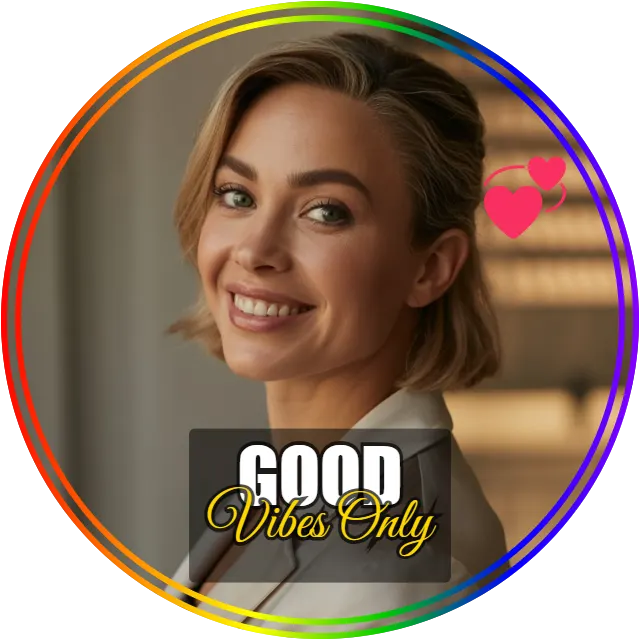
Snapchat DP maker example with rainbow gradient border, heart sticker, and good vibes only quote, generated with DP Maker tool
No upload · No signup · 100% free
640 × 640 · WhatsApp
Drag text on canvas to move
JPG
PNG
WebP
Quality 92%

What Size is a Snapchat Profile Picture

Example Snapchat DP made with DP Maker, showing rainbow gradient border, sticker, and text overlay on a 320x320px transparent circle PNG, no signup no watermark

Snapchat displays every profile picture at exactly 320×320 pixels, cropped into a circle. That’s the size DP Maker uses the moment you select Snapchat — no resizing, no guessing.

It matters more on Snapchat than on most apps. Your DP shows up small and circular in your friends list, in chat threads, and on Snap Map — there’s no room for a photo that’s off-center or stretched. A photo cropped from the wrong dimensions gets squeezed into that circle awkwardly, and faces end up distorted right where people are looking first.

Upload a rectangular photo without the right snapchat profile picture size and Snapchat (or whatever tool you used) crops it blind — sometimes from the center, sometimes cutting off half a face. With DP Maker, the 320×320 frame and the circle preview are right there while you edit, so you see the exact final crop before you download anything.

If you’ve ever wondered about snapchat dp size pixels, this is the only number to remember: 320×320. No other dimension works correctly.

 

How to Make a Snapchat DP

Making a snapchat dp takes under a minute. Here’s the full process:

  1. Open DP Maker — no signup, no account, no login. It loads straight into the editor.
  2. Upload your photo — JPG, PNG, WebP, AVIF, or HEIC all work. iPhone users can upload straight from their camera roll without converting anything first.
  3. Snapchat’s size is pre-selected — 320×320px is already set the moment you land on this page. Nothing to configure.
  4. Choose your crop mode — Fill for a close-up portrait that fills the whole circle, Fit if you want the full photo visible with a background behind it, or Manual if you want to drag and zoom the crop yourself.
  5. Customize — this is where most people spend their time. Add a Birthday or Halloween preset, a gold frame, a rainbow gradient border, your name as a text overlay, a sticker, or an emoji rotated at an angle.
  6. Download — JPG, PNG, or WebP, full resolution, no watermark, ever.

That’s the whole make dp for snapchat workflow. No app to install, nothing to learn.

Tips for a Great Snapchat Profile Picture

A few things make a Snapchat DP actually work for this app’s audience, instead of just being a resized photo.

Skip the default Bitmoji if you want to look like yourself.

A real photo as your snapchat profile picture instead of bitmoji reads as more personal in close-friends lists — your cartoon avatar doesn’t change when your hair does, but your photo can.

Put your name on it if your friends list has overlap with other apps.

Snapchat usernames don’t always match what people call you. A short first name in a clean script font, placed low on the circle, solves that instantly — this is the most requested custom text dp snapchat request DP Maker gets.

Use Fit mode if your photo is too tight to crop well.

If your best photo is a wide group shot or a landscape, Fill mode forces an aggressive crop. Fit mode keeps the whole image visible and fills in the background around it, so nothing important gets cut off.

Real example:

Zainab updates her Snapchat DP every year for her birthday. She picks the Birthday event preset, switches on the rainbow gradient border, adds a sparkle emoji rotated about 30 degrees near the corner of the circle, and types her name in Pacifico font on the second text line. The whole edit — preset, border, emoji, name — takes her under a minute, and she downloads straight to her camera roll at 320×320px with snapchat dp with stickers auto-filtered to birthday options only.

Try B&W if you want something that doesn’t look like everyone else’s filter.

Vivid gets used by almost everyone for celebration DPs. A clean black-and-white photo, by contrast, stands out in a feed full of color — and it works particularly well for a quieter, more personal black and white snapchat dp.

Features That Make Your Snapchat DP Stand Out

Stickers — Filtered by Event, Not by Scrolling

DP Maker has 47 stickers built directly into the canvas, and they auto-filter the moment you pick an event preset. Choose Birthday and the sticker panel narrows to birthday stickers only — same for Halloween, Christmas, and New Year. No scrolling past stickers that don’t apply to your occasion.

This is what makes dp maker with stickers free actually fast to use instead of a chore. Each sticker has its own size, position, and opacity controls once placed, so you’re not stuck with a fixed size or spot. For anyone searching birthday sticker dp maker or halloween sticker dp maker, the event-to-sticker connection is the part competitors don’t have.

Emojis With Rotation — A Genuinely Unowned Angle

96 emojis are available as text-rendered elements you can place, resize, and — this is the part nobody else offers — rotate. A heart emoji sitting straight up looks fine. The same emoji rotated 20 degrees near the edge of your circle looks intentional, like a sticker placed by hand rather than dropped in by a template.

This single control answers a lot of emoji on dp online free searches that current tools can’t, since most emoji overlays on free editors are locked at a fixed angle. Combine it with the Celebration or Hearts emoji category and you’ve got a fast add emoji to snapchat dp free workflow that takes seconds.

Event Presets — Birthday, Halloween, Christmas, New Year

Snapchat’s four biggest DP moments — Birthday, Halloween, Christmas, New Year — each have a dedicated preset with their own ring colors, and each is fully customizable on top of the default.

Birthday

runs year-round and is, by far, the highest-frequency reason people change their Snapchat DP outside of a general refresh. The preset applies pink and purple dashed rings, and Ring 1, 2, and 3 each have independent color pickers if you want to match a different palette.

Halloween

applies orange and black alternating rings — a genuinely low-competition keyword on the search side, which means it’s also one of the few times of year almost nobody else has built a dedicated free tool for it. Pair it with the B&W filter for a deliberately eerie look, or keep Vivid on for full color.

Christmas

uses alternating red and green rings, and New Year applies gold starburst dots — both pair naturally with a gold frame layered underneath for extra shine. Every preset auto-filters the sticker panel, so your event choice carries through the whole edit, not just the ring.

Gold Frames — 12 Styles, Drawn for Any Resolution

DP Maker includes 12 ornamental gold frame styles, each drawn directly with the Canvas API rather than as an image file — meaning they render crisp at full resolution, not pixelated at the edges the way a flattened PNG frame would. Opacity and Scale sliders let you dial the frame back if it’s too heavy for your photo.

Gold frames pair especially well with Birthday and New Year presets for a snapchat dp gold frame look that reads as celebratory without needing any other editing. Search for 12 gold frames dp maker and you’ll find DP Maker is one of the only free tools with that exact count — most competitors top out at far fewer styles, if they offer this at all.

Rainbow Gradient Border — The Platform-Natural Choice

The Border panel includes a full gradient border system, and on Snapchat, the Rainbow preset is the one that fits best. One click applies a full-spectrum ring around your circular photo — fast, colorful, and built for an audience that skews younger and more playful than most other platforms.

If Rainbow isn’t quite your style, Custom opens a multi-stop gradient builder with unlimited color stops and its own live preview bar, so you can build something nobody else’s DP looks like. This kind of rainbow border profile picture maker control is rare in a free tool — most competitors only offer flat, single-color borders.

DP Maker vs Canva vs Adobe Express vs Fotor— Which One Actually Works for Snapchat?

Feature DP Maker Canva Adobe Express Fotor Why it matters for Snapchat
Signup required No Yes Yes Yes (for HD) You're swapping out a Bitmoji in two minutes between Snaps — an account wall kills that.
Watermark on free tier Never No No Sometimes A watermark on a 320×320 circle is impossible to hide — your friends list would see it instantly.
Transparent circle PNG (no white box) Yes No No No Snapchat already renders your photo as a circle — a square PNG with white corners looks broken behind it.
Photo upload privacy Browser-only, never uploaded Uploaded to server Uploaded to server Uploaded to server Gen Z users are particular about where a personal photo ends up — this one never leaves your phone.
Real photo editing (not AI-generated) Yes Limited Limited AI-focused You want to look like you, with a frame and a name on it — not an AI reinterpretation of your face.
Platform-exact sizing Yes, auto Manual Manual Manual 320×320px is set automatically — no measuring, no guessing what Snapchat actually wants.

No signup needed. Your Snapchat DP is ready.

Your Snapchat Photo Stays Private

Snapchat’s whole reputation was built on photos that disappear and don’t get archived elsewhere. DP Maker fits that same instinct: your photo is never uploaded to any server while you edit it. Every crop, filter, frame, and sticker placement happens inside your browser, using your device’s own processing.

No account means no profile attached to your photo anywhere outside Snapchat itself. HEIC photos straight from an iPhone work without converting — no extra app, no extra step that exposes the file to anything else first.

You could disconnect your wifi after the page loads and DP Maker would keep working. That’s a fair test of how local the editing actually is.

How People Actually Use Snapchat DP Maker

Zainab’s birthday DP.

Every year on her birthday, Zainab opens DP Maker, picks the Birthday preset, switches on the rainbow gradient border, and adds a sparkle emoji rotated near the edge. Her name goes on the second text line in Pacifico. Downloaded at 320×320px, posted before she even finishes her coffee.

Amir’s Halloween switch.

Amir wanted something darker than his usual photo for Halloween. He selected the Halloween preset, turned the B&W filter on, and left the rest of the photo untouched — the orange and black rings did the rest of the work. No signup, no account, done in under a minute.

Replacing the Bitmoji for good.

A college student tired of her cartoon avatar uploaded a real photo, used Fill mode for a tight crop, added a thin rainbow border, and downloaded a transparent circle PNG — no white box behind it, since Snapchat shows everything as a circle anyway. Her snapchat profile picture instead of bitmoji swap took less time than picking a new outfit for her avatar would have.

Frequently Asked Questions

What size is a Snapchat profile picture?

320×320 pixels, displayed as a circle. DP Maker sets this automatically the moment you load this page — no manual resizing needed.

Switch to Fit mode instead of Fill. Fit keeps your entire photo visible inside the circle and fills the space around it with a blurred, gradient, or solid-color background, so nothing important gets cut off.

Upload your photo to DP Maker, choose Fill or Fit mode, customize with a frame or border if you want one, and download at 320×320px. Then open Snapchat settings, go to your profile, and replace the Bitmoji image with your downloaded file.

No. DP Maker never adds a watermark on any download, on any plan, because there is no paid plan. What you create is fully yours.

Yes. HEIC files upload directly with no conversion step. AVIF from newer Android phones works the same way.

Open the Border panel, switch to Gradient Border, and select the Rainbow preset. It applies instantly. Use Custom instead if you want to build your own multi-color gradient.

Select the Birthday event preset from the Events panel. The sticker panel automatically filters to birthday stickers, and you can layer a gold frame or text overlay with your name on top.

Also Try

If you need to shrink your downloaded DP further for a slow connection, or convert it to a different format before sharing it anywhere else, imagecompressorconverter.com handles that — also free, also no signup.

This page is part of the full DP Maker tool, which supports 16 platforms from one editor.

Updating your DP across more than one app? Try the WhatsApp DP Maker for Eid and Ramadan presets, or the TikTok DP Maker if you want the same vivid filters and sticker setup on a second platform.